
Our Custom Lead Upload streamlines the process of importing and managing your own lead data through structured CSV uploads. It supports essential fields like customer name, phone, email, address, source, and category, ensuring clean and organized records. Designed to automate lead preparation for follow-ups, reporting, and CRM workflows, it’s perfect for businesses, sales teams, and agencies seeking reliable, ready-to-use lead data to drive efficient, data-driven engagement.
Try For Free
30+
Scraping Tools
10+
CRM Tools
10M+
Emails
15M+
Contact Number

Create a CSV file with the required fields: title (customer name), phone, email, address, source, and category. Ensure all columns are correctly named for accurate data processing.
Create a CSV file with the required fields: title (customer name), phone, email, address, source, and category. Ensure all columns are correctly named for accurate data processing.
Try NowUpload the prepared CSV file into the tool using the upload option. The system will automatically read and validate the required fields.
Try NowUpload the prepared CSV file into the tool using the upload option. The system will automatically read and validate the required fields.
Once uploaded, the tool validates the CSV data and processes the records. Any missing or incorrect fields can be reviewed before final submission.
Once uploaded, the tool validates the CSV data and processes the records. Any missing or incorrect fields can be reviewed before final submission.
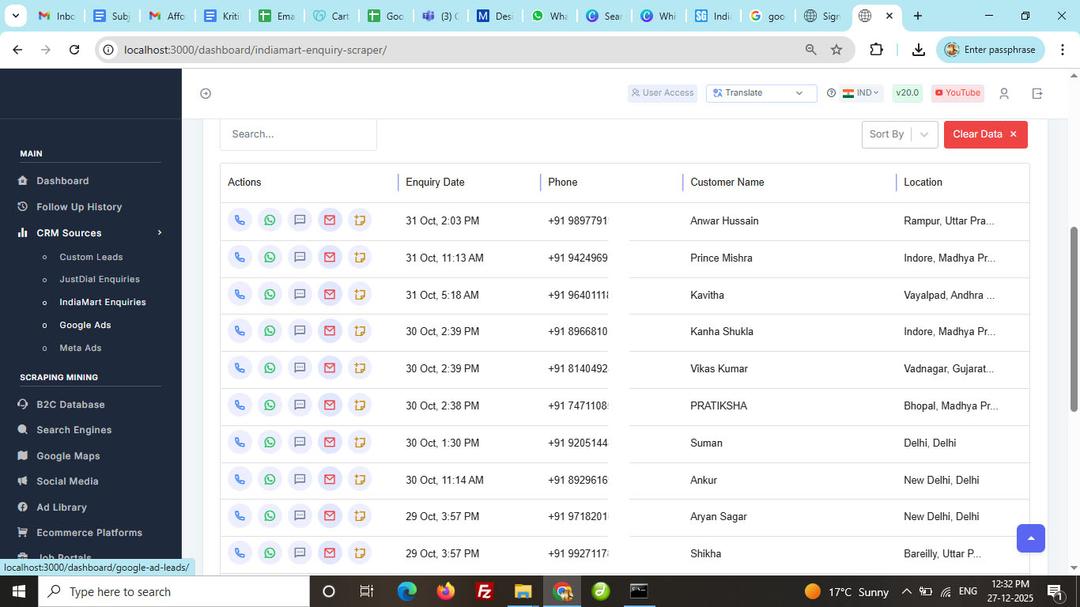
Try NowAfter successful processing, all leads are displayed in the dashboard table with customer details, source, and category information.
Try NowAfter successful processing, all leads are displayed in the dashboard table with customer details, source, and category information.
Once the data is displayed, the leads are ready for follow-ups. Assign status, schedule follow-ups, and track interactions directly from the CRM.
Once the data is displayed, the leads are ready for follow-ups. Assign status, schedule follow-ups, and track interactions directly from the CRM.
Try NowAfter managing your leads, you can download or export the processed data for reporting, sharing, or external CRM usage.
Try NowAfter managing your leads, you can download or export the processed data for reporting, sharing, or external CRM usage.
Effortlessly scrape data from Google Maps, websites, and directories with precision.
We ensure top-tier data privacy and protection for all your scraping projects.
Our global team is always ready to assist you with any query or concern.
Avoid IP blocks and CAPTCHAs with built-in advanced anti-scraping technology.
Start scraping instantly with a simple and intuitive user interface.
Access your tools and scraped data anywhere, anytime, with seamless cloud support (coming soon).